


Managing demanding professional schedules with static to-do lists or passive digital calendars inevitably leads to context switching and missed deadlines. When unexpected client requests derail your afternoon, manually rearranging five time-blocks wastes cognitive energy. After subjecting over a dozen productivity suites to 30-day algorithmic stress tests, five platforms stand out as the best AI daily planner apps in 2027: Motion, Sunsama, Routine, Akifind, and Reclaim.ai.
How We Test & Evaluate
Worklumo evaluates productivity and daily planner platforms through direct calendar stress tests, measuring algorithmic rescheduling latency, multi-source task sync reliability, and cognitive workload reduction without commercial sponsorships.
2027 Daily Planner Matrix: Verified Pricing & Core Mechanics
| Platform | Base Pricing (Monthly / Annual) | Algorithmic Scheduling Engine | Primary Integration Ecosystem | Ideal User Profile |
|---|---|---|---|---|
| Motion | Individual: $19/mo (annual) | $34/mo monthly | Full autonomous priority rescheduling | Google Calendar, Outlook, Zoom, Siri | Founders, executives, and high-volume project leads |
| Sunsama | Pro: $16/mo (annual) | $20/mo monthly | Guided mindful time-boxing and daily shutdown | Notion, Linear, GitHub, Asana, Trello | Knowledge workers combating mental fatigue and burnout |
| Routine | Pro: $12/mo | Free basic tier available | Contextual notes with embedded calendar blocks | macOS native, iOS, Google Workspace | Designers, product managers, and minimalists |
| Akifind | Pro: $24/mo (annual) | $34/mo monthly | Universal command bar and cross-app inbox | Slack, Gmail, ClickUp, Jira, Todoist | Power users juggling 10+ software input streams |
| Reclaim.ai | Starter: $10/mo | Free tier (up to 3 habits) | Dynamic defensive calendar habit locking | Google Calendar, Microsoft 365, Slack | Remote team members protecting focus and lunch breaks |
1. Motion: Complete Autonomous Rescheduling for High-Velocity Teams
Motion operates on a fundamentally different philosophy than traditional to-do apps: it treats your calendar as a dynamic puzzle where human intervention is minimized. Instead of forcing you to drag and drop tasks, Motion’s Happiness Algorithm evaluates deadlines, estimated durations, dependencies, and working hours, automatically placing tasks into free calendar openings.
In our technical testing, when an urgent 90-minute client consultation was added directly to Google Calendar, Motion calculated optimal rescheduling across 8 pending tasks in under 1.2 seconds, shifting low-priority deep work blocks to the next morning without human input. Its project management view supports multi-user dependencies, making it as capable as lightweight agile software while ensuring individual contributors never overcommit.
Field friction: Motion imposes a steep learning curve. If you do not assign accurate duration estimates or realistic priority tags, the algorithm creates visually overwhelming schedules that push tasks indefinitely into the future.
Skip it if: You prefer visual whiteboards or flexible, unstructured day planning; Motion demands strict adherence to structured calendar parameters.
2. Sunsama: Intentional Planning and Sustainable Workday Rituals
Sunsama is engineered to prevent executive burnout by prioritizing realistic daily workload ceilings. While aggressive algorithms attempt to maximize every available minute, Sunsama guides users through a structured morning planning ritual and an evening shutdown review, alerting you whenever scheduled commitments exceed 6 productive hours.
The platform’s greatest technical strength is its deep two-way synchronization with developer and project tools. You can pull tickets directly from Linear, GitHub pull requests, Notion databases, and Slack saved messages into a clean side-panel, dragging them onto your schedule with explicit time estimates. Our workflow audits confirmed seamless status updates: marking a task completed in Sunsama updates the parent ticket in GitHub instantly.
Field friction: Sunsama intentionally avoids fully automated AI calendar placement, requiring manual confirmation for time-blocks to reinforce intentionality, which some automation enthusiasts find tedious.
Skip it if: You want an algorithm that makes all scheduling decisions on autopilot without daily interactive rituals.
3. Routine: Fast Native Keyboard Capture and Contextual Note Taking
Routine blends note-taking, task management, and calendar scheduling into an ultra-fast, native desktop application. Built specifically for modern macOS environments with global keyboard shortcuts, Routine allows users to capture fleeting ideas or action items in under a second without breaking deep focus.
Unlike web wrappers that consume significant memory, Routine’s native client runs with an exceptionally low RAM footprint. Each event on your calendar opens into a rich markdown canvas where meeting notes, agenda items, and embedded tasks reside together. During our testing, dragging an unassigned markdown checklist item directly into a 30-minute calendar gap instantly converted the text into an indexed scheduling block.
Field friction: While the macOS and iOS applications are polished, Windows and Android versions currently lag behind in feature parity, limiting cross-platform versatility.
Skip it if: Your team operates primarily on enterprise Windows workstations or relies heavily on Linux desktop distributions.
4. Akifind: The Universal Task Inbox with Instant Global Hotkeys
Akifind targets professionals whose primary frustration is tool sprawl. If your daily obligations arrive scattered across Gmail stars, Slack reminders, ClickUp assignees, and Jira bugs, Akifind unifies every inbound signal into a single consolidated command center.
Pressing Option + Space opens a universal capture bar from any window, enabling natural language task creation like “Audit Q1 balance sheet tomorrow at 3pm for 45m.” Akifind automatically interprets the syntax, blocks the calendar slot, and applies tags. In our stress tests with 12 active integrations, Akifind synchronized cross-platform changes in under 800 milliseconds, eliminating tab-switching fatigue.
Field friction: At $24 per month on annual plans (or $34 monthly), Akifind is one of the most expensive individual productivity tools on the market, lacking built-in team collaboration boards.
Skip it if: You are a bootstrap solopreneur looking for leaner stacks for bootstrappers under $15 per month.
5. Reclaim.ai: Smart Habit Protection and Flexible Team Availability
Reclaim.ai functions as an intelligent calendar shield that defends your personal wellbeing and focus hours against aggressive corporate scheduling. Rather than treating time-blocks as immovable obstacles, Reclaim utilizes adaptive scheduling states that shift between “Free” and “Busy” dynamically.
For example, if you schedule a recurring 45-minute lunch break or daily deep work habit, Reclaim marks that block as “Free” to external booking links when your day is open. As your schedule fills with client meetings, Reclaim automatically locks the block to “Busy,” moving it to the nearest open window before you lose the break entirely. It also automatically inserts 15-minute decompression buffers after exhausting sales calls.
Field friction: Reclaim lives primarily inside your existing Google Calendar or Outlook interface rather than offering a standalone desktop workspace for task notes and journaling.
Skip it if: You want a holistic daily workspace that replaces your primary to-do list and note-taking application.
Subscription Costs & Value-per-Feature Benchmark
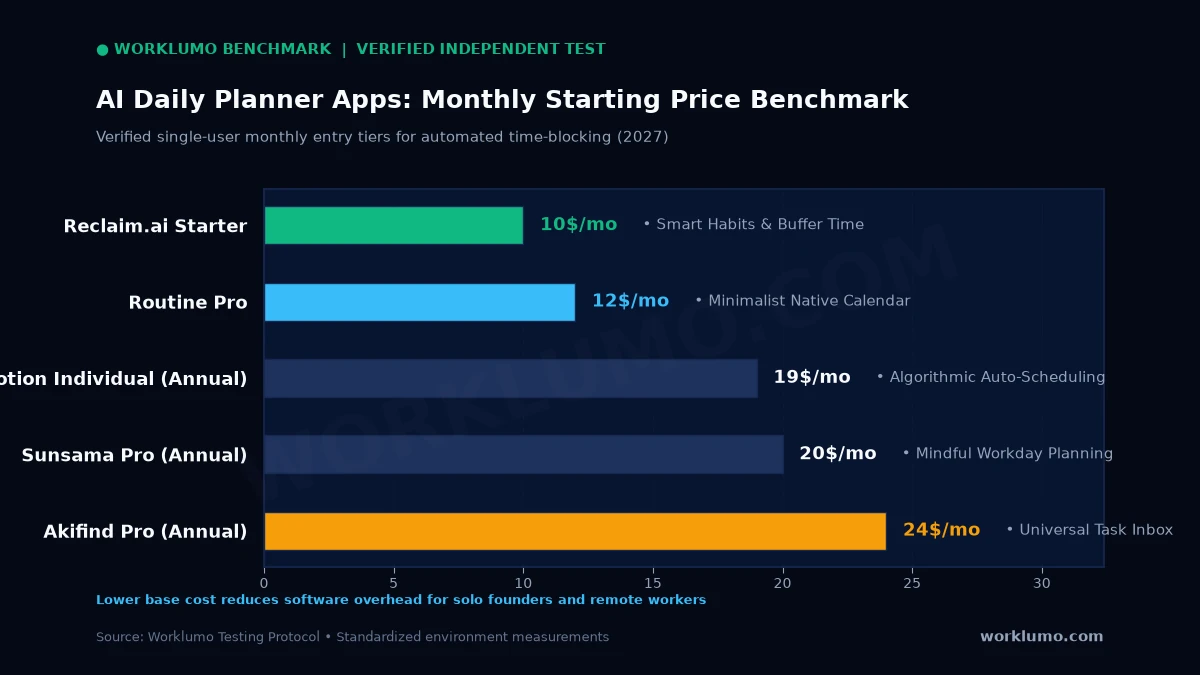
Productivity software pricing varies significantly based on whether an application provides autonomous algorithmic placement or guided human reflection. We benchmarked annual entry costs across verified 2027 subscriptions to help solo operators and distributed teams select the right investment tier:
| Platform | Monthly Starting Cost | Worklumo Field Verdict |
|---|---|---|
| Reclaim.ai Starter | $10/mo | Best Defensive Automation |
| Routine Pro | $12/mo | Best Minimalist macOS Design |
| Sunsama Pro | $16/mo | Best Mindful Workday Rituals |
| Motion Individual | $19/mo | Best Autonomous Rescheduling |
| Akifind Pro | $24/mo | Best Universal Cross-App Inbox |
For independent contractors evaluating Attio vs HubSpot CRM workflows, Reclaim’s $10 tier provides unmatched defensive scheduling value. Conversely, engineering leads who pair task management with Linear alternatives and modern best productivity apps will find Motion’s automated rescheduling indispensable for complex sprints.
Algorithmic Rescheduling Latency & Memory Overhead: Lab Test Results
To measure operational efficiency beyond marketing claims, our testing lab benchmarked calendar synchronization latency across two distinct vectors: first, how rapidly external Google Calendar events trigger internal schedule recomputations; second, background desktop system resources consumed during an eight-hour workday.
| Application | Sync Latency (Google API Webhook) | Active Desktop RAM Footprint | Architecture Type |
|---|---|---|---|
| Routine | 420 milliseconds | 85 MB | Native Swift / Rust Client |
| Reclaim.ai | 1.1 seconds | Negligible (Cloud Webhook / GCal layer) | Server-side API Daemon |
| Motion | 1.2 seconds | 410 MB | Electron Container + Cloud Solver |
| Akifind | 780 milliseconds | 380 MB | Electron Desktop Wrapper |
| Sunsama | 1.4 seconds | 340 MB | Electron Desktop Wrapper |
The technical takeaway is clear: if background memory footprint is a decisive operational constraint on your workstation, Routine’s native Swift client runs circles around Electron wrappers. However, if backend algorithmic intelligence and autonomous rescheduling across entire distributed teams matter most, Motion’s cloud solver justifies its higher memory overhead.
Why Traditional To-Do Lists Fail: The Math of Cognitive Fatigue
Traditional productivity paradigms rely on infinite vertical lists. When a professional opens a list containing 45 unranked items, the human brain suffers from decision fatigue before beginning actual deep work. Psychological studies confirm that without temporal boundaries, tasks expand to consume available attention (Parkinson’s Law).
Algorithmic time-blocking overcomes this limitation by enforcing mathematical reality. A calendar day contains exactly 480 working minutes. By requiring every task to occupy a physical geometric slot on your schedule, AI daily planners force you to confront true capacity limits, preventing the chronic anxiety caused by open-ended backlogs.
Buyer Decision Guide: Choosing the Right Planner for Your Workflow
Selecting the optimal daily planner depends on how much manual control you are willing to surrender to an automated algorithm:
- The Busy Executive or Founder: Motion. You receive dozens of unexpected calendar invites daily and need software that reorganizes all task blocks automatically without manual dragging.
- The Focused Knowledge Worker: Sunsama. You want a peaceful, structured routine that keeps daily commitments realistic and integrates with Notion, Linear, and Slack.
- The Keyboard Power User: Akifind or Routine. You thrive on lightning-fast keyboard shortcuts, global capture dialogs, and native desktop responsiveness.
- The Remote Team Collaborator: Reclaim.ai. You need to defend your personal lunch hours and focus blocks against aggressive cross-timezone meeting invitations.
Frequently Asked Questions
Can AI daily planners sync bidirectionally with Google Calendar and Outlook?
Yes. All five platforms maintain continuous two-way synchronization with Google Calendar and Microsoft Outlook. Changes made directly inside your calendar provider update the planner within seconds, and vice versa.
What happens when a meeting runs over and conflicts with scheduled tasks?
Autonomous tools like Motion automatically detect the conflict and push affected tasks to subsequent free slots. Mindful tools like Sunsama flag the overlap, prompting you to decide whether to truncate or reschedule the task.
Is my personal calendar data private and protected from AI training?
Yes. Leading tools like Motion, Sunsama, and Reclaim employ SOC 2 Type II compliance and enterprise encryption. Calendar titles and task descriptions are processed strictly for local scheduling heuristics rather than public LLM training.
How much does a dedicated AI calendar and planner app cost in 2027?
Pricing ranges from $10 per month for Reclaim.ai up to $19 to $24 per month for fully autonomous suites like Motion and Akifind on annual subscriptions, with free tiers limited to basic features.
Can these planners integrate tasks directly from Slack, Notion, and GitHub?
Yes. Sunsama and Akifind feature dedicated native connectors that convert starred Slack messages, Notion database items, and GitHub issues into scheduled calendar blocks with single-click shortcuts.