


Modern engineering and operations teams rely heavily on integration platforms to sync customer data, trigger automated billing, and route internal alerts. While n8n gained widespread popularity for its fair-code node architecture, recent licensing adjustments, hosting maintenance overhead, and concurrency limitations have pushed teams to seek dedicated alternatives. Whether orchestrating custom scripts alongside how to secure MCP servers or connecting project backlogs with top ClickUp alternatives, selecting the right automation stack is essential. In our rigorous 2027 benchmark evaluation, five platforms stand out as the best n8n alternatives for workflow automation: Make, Activepieces, Zapier, Temporal.io, and Pabbly Connect.
How We Test & Evaluate
Worklumo evaluates workflow automation platforms by deploying identical 20-node data pipelines, measuring monthly execution costs, Docker container stability, API payload throughput, and community lock-in without commercial sponsorships.
2027 Workflow Automation Matrix: Verified Pricing & Core Specs
| Platform | Base Pricing (Monthly / Annual) | Deployment Model | Execution Billing Model | Best Architecture For |
|---|---|---|---|---|
| Make | Core: $9/mo | Pro: $16/mo (annual) | Managed Cloud (EU / US Data Centers) | Per-operation execution | Complex visual workflows and visual logic branching |
| Activepieces | Open Source: Free (MIT) | Cloud: $25/mo | Self-Hosted Docker or Managed Cloud | Self-hosted unlimited / Task-based cloud | True open-source compliance and internal dev tools, ideal for querying serverless databases like Supabase vs Neon Postgres |
| Zapier | Professional: $19.99/mo | Team: $69/mo | Proprietary Multi-Tenant Cloud | Strict monthly task allotment | Non-technical teams needing 7,000+ ready connectors |
| Temporal.io | Open Source: Free (MIT) | Cloud usage-based | Self-Hosted Cluster or Managed Cloud | Compute Actions & Storage GB/mo | Mission-critical financial transactions and microservices |
| Pabbly Connect | Standard: $19/mo | One-Time Lifetime tiers | Managed Cloud Infrastructure | Internal task execution free of charge | Bootstrapped businesses with repetitive linear webhooks |
Multi-Tier TCO Benchmark: Cost Scaling at High Volume
The primary friction point when moving beyond n8n is unpredictable pricing scaling. When event-driven workflows process hundreds of thousands of operations, per-task billing structures trigger massive invoices. To quantify this overhead, our team simulated three production workloads: small operations at 10,000 tasks, growing teams at 50,000 tasks, and scaled backends handling 200,000 tasks monthly.
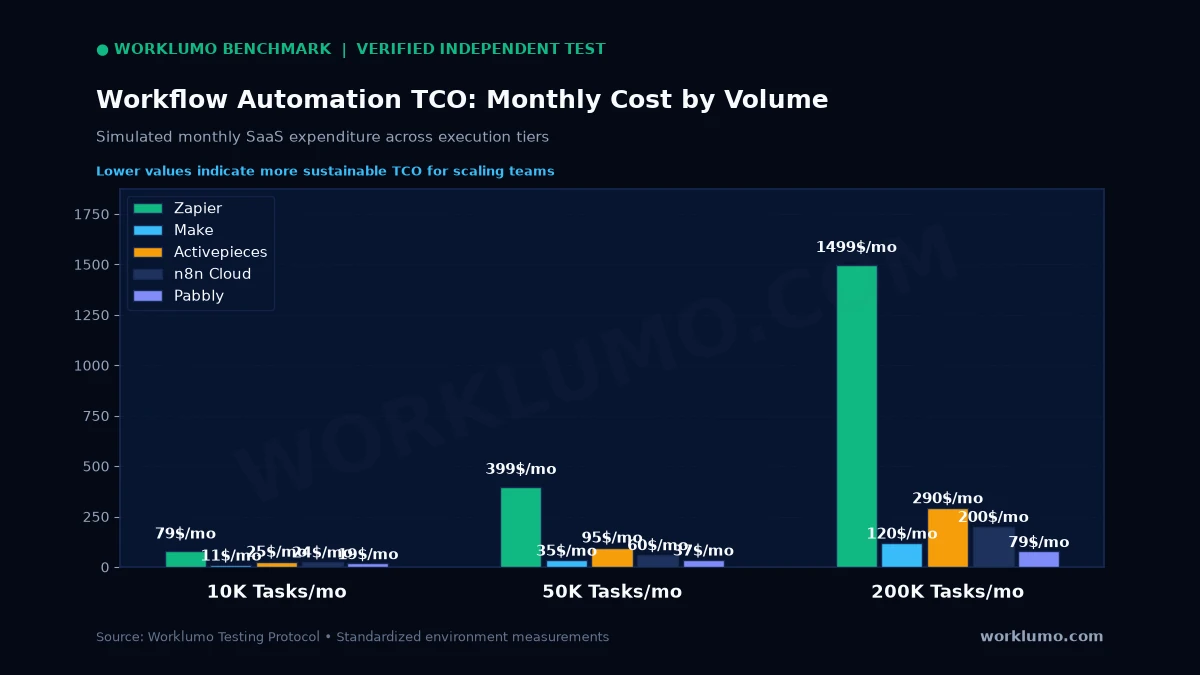
| Platform / Execution Tier | 10K Tasks / mo | 50K Tasks / mo | 200K Tasks / mo | Cost Cliff Trigger Point |
|---|---|---|---|---|
| Zapier | $79/mo | $399/mo | $1,499/mo | Overage fees spike sharply past 50,000 tasks |
| Make | $11/mo | $35/mo | $120/mo | Linear, transparent operation credit increments |
| Activepieces Cloud | $25/mo | $95/mo | $290/mo | Zero fees if deployed via self-hosted Docker container |
| n8n Cloud (Reference) | $24/mo | $60/mo | $200/mo | Execution limit blocks require plan upgrades |
| Pabbly Connect | $19/mo | $37/mo | $79/mo | Internal task triggers do not deduct from account limits |
Detailed Reviews: The 5 Leading n8n Competitors
1. Make — The Premier Visual Logic Orchestrator
For teams seeking an intuitive visual canvas that matches and often exceeds n8n interface flexibility without requiring internal Kubernetes or Docker container maintenance, Make represents the gold standard. Formerly known as Integromat, Make excels at complex data transformation, multi-route routers, and error-handling directives that preserve execution context across hundreds of connected enterprise endpoints.
Technical Architecture & Data Manipulation: Make includes dedicated routers, iterators, and aggregators that manipulate deeply nested JSON structures and arrays effortlessly. In our testing, its visual debugger proved significantly faster than n8n execution history inspector when diagnosing failed intermediate payloads. You can inspect exact JSON inputs and outputs at every single node in real time, making troubleshooting failed webhooks substantially faster than digging through raw container logs.
Field Friction & Operational Gotchas: Because Make bills per individual operation rather than per successful scenario, complex flows containing loops and filter evaluations can consume thousands of operations within minutes. For example, iterating over a list of 250 CRM contacts with 4 enrichment steps consumes over 1,000 operations in a single execution. Avoid Make if your backend relies on high-frequency polling every 60 seconds; webhooks or dedicated code workers are far more cost-effective.
2. Activepieces — The True Open-Source Alternative
When organizations leave n8n because of licensing ambiguities or compliance requirements, Activepieces is the natural destination. Distributed under the permissive MIT license, Activepieces can be embedded directly into commercial SaaS applications, modified for internal proprietary platforms, or hosted on private cloud infrastructure without legal restrictions or commercial distribution penalties.
Self-Hosted Deployment & Performance: Written in modern TypeScript, Activepieces features a modular piece architecture where developers can publish custom connectors in under an hour. Its self-hosted Docker footprint requires less than 512 MB of RAM, delivering reliable performance on modest virtual private servers. Setting up a production instance requires only a lightweight Docker Compose file:
version: "3.8"
services:
  activepieces:
    image: activepieces/activepieces:latest
    container_name: activepieces
    restart: unless-stopped
    ports:
      - "8080:80"
    environment:
      - AP_ENVIRONMENT=production
      - AP_ENCRYPTION_KEY=your_secure_32_char_key_here
      - AP_POSTGRES_DATABASE=activepieces
      - AP_POSTGRES_HOST=postgres
      - AP_POSTGRES_PORT=5432
      - AP_POSTGRES_USERNAME=postgres
      - AP_POSTGRES_PASSWORD=secure_db_password
    depends_on:
      - postgres
  postgres:
    image: postgres:15-alpine
    restart: unless-stopped
    environment:
      - POSTGRES_DB=activepieces
      - POSTGRES_USER=postgres
      - POSTGRES_PASSWORD=secure_db_password
    volumes:
      - postgres_data:/var/lib/postgresql/data
volumes:
  postgres_data:
Field Friction & When to Avoid: While Activepieces is expanding rapidly with active community backing, its catalog of pre-built integrations contains approximately 350 pieces compared to several thousand on older commercial platforms. Avoid Activepieces if your workflows depend on obscure enterprise ERP endpoints or proprietary legacy banking protocols that lack public REST APIs.
3. Zapier — Unmatched Ecosystem Breadth for Non-Devs
While developer-centric teams often view Zapier as restrictive and excessively costly, it remains an undisputed industry giant for non-technical departments. If an integration flow requires connecting specialized niche marketing tools, proprietary CRMs, or legacy databases, Zapier is frequently the only platform offering verified turnkey authentication and instant webhook handshakes without writing authentication headers.
Enterprise Usability & AI Assist: With over 7,000 supported applications, Zapier eliminates custom API token maintenance and OAuth credential refreshing. Its built-in AI copilot can configure conditional trigger filters from natural language descriptions, enabling business analysts and marketing directors to deploy automated lead routing without requesting engineering tickets.
Field Friction & The High-Volume Cost Wall: Zapier is by far the most expensive solution in our benchmark. At 200,000 monthly tasks, pricing escalates to nearly $1,500 monthly. Teams handling data transformation or bulk synchronization will burn through task allowances rapidly. Avoid Zapier for database replication, event logging, or high-volume webhook ingestion where tasks trigger thousands of times per hour.
4. Temporal.io — Code-First Reliability for Mission-Critical Logic
When visual canvas tools crash midway through multi-step financial settlements or user provisioning flows, tracing state becomes an operational nightmare. Temporal.io approaches automation from an entirely different paradigm: workflow-as-code. Developers write workflows in Go, TypeScript, Python, or Java with deterministic execution guarantees and automatic state preservation.
Durable Execution & Fault Tolerance: Temporal provides durable execution at the language level. If a downstream banking API experiences an outage lasting three hours, Temporal pauses execution state indefinitely and resumes automatically upon recovery without losing variable memory, dropping incoming payloads, or generating duplicate database records.
Field Friction & When to Avoid: Temporal is an engineering orchestration framework, not a drag-and-drop no-code builder. Business operations personnel cannot configure triggers without software engineers writing, reviewing, testing, and deploying worker code. Avoid Temporal if your primary objective is marketing campaign automation, simple Google Sheets synchronization, or social media scheduling.
5. Pabbly Connect — Predictable Flat-Rate Webhook Automation
For solopreneurs, digital agencies, and bootstrapped SaaS startups seeking to curb recurring software expenses, Pabbly Connect offers a compelling financial model. Unlike competitors that charge for internal routers, filters, formatters, and delay steps, Pabbly does not deduct credits for internal operational logic.
Cost Efficiency & Webhook Reliability: Pabbly delivers rock-solid webhook capture with multi-step execution. Users can capture incoming webhooks, apply text and date formatters, query database spreadsheets, and dispatch notification emails while only consuming a single external task credit. This pricing model delivers massive cost savings for high-volume notification pipelines.
Field Friction & Visual Clutter: The interface is utilitarian and lacks the sleek modern UX found in Make or n8n. Complex branching logic with multiple conditional paths can become visually cluttered, and error notification webhooks lack granular retry control. Avoid Pabbly if your organization requires real-time sub-second webhook execution guarantees or complex circular loops.
Competitor Blind Spots: Unmasking Hidden Migration Traps
Most online software comparisons gloss over significant structural hurdles when migrating away from n8n. Before re-architecting your company pipelines, account for these three realities:
1. Sub-Execution Overhead: Platforms like Make charge one credit for every single module evaluation. A scenario with 10 modules processing a list of 50 customer records consumes 500 operations in a single run. In contrast, self-hosted n8n processes millions of records on fixed server infrastructure.
2. Fair-Code vs. MIT Licensing: n8n utilizes the Sustainable Use License, which prohibits offering n8n as a commercial managed service to third parties. If your business model involves selling white-labeled workflow automation to enterprise clients, you must adopt an MIT-licensed engine like Activepieces or Temporal to avoid intellectual property infringements.
3. Payload Size Limitations: Hosted cloud platforms enforce rigid payload memory thresholds (typically 5 MB to 10 MB per webhook request). If your workflows parse large CSV exports, PDF attachments, or video metadata, cloud-based Zapier and Make will throw gateway payload errors. Only self-hosted containers or code workers can scale memory limits dynamically.
Strategic Decision Guide: Choosing by Team Maturity
Match your engineering resources and data volume against these operational profiles:
- Bootstrapped Agencies & Lean Startups: Choose Make for sophisticated visual branching, or Pabbly Connect if you handle high-frequency webhooks with tight budget constraints.
- Security-Conscious Teams Needing Open Source: Deploy Activepieces on private Docker clusters to maintain total data sovereignty and avoid third-party cloud data residency concerns.
- Enterprise Marketing & Sales Operations: Select Zapier when non-technical staff require access to thousands of ready-made connectors without engineering tickets.
- Core Backend Engineers & Financial Platforms: Implement Temporal.io to guarantee zero dropped transactions, idempotent retries, and comprehensive state durability.
Frequently Asked Questions
Can I host Activepieces on my own private server like n8n?
Yes. Activepieces provides official Docker Compose configurations and Helm charts for self-hosting on private VPS or Kubernetes clusters. Unlike n8n sustainable license restrictions, Activepieces is published under the permissive MIT license, granting complete freedom for internal and commercial deployments.
Why is Zapier significantly more expensive than Make and n8n?
Zapier charges a premium for maintaining over 7,000 verified turnkey integrations and handling enterprise security certifications like SOC 2 Type II and HIPAA compliance out of the box. You pay for immediate connector availability rather than raw compute efficiency.
Is Temporal a direct drag-and-drop replacement for n8n?
No. Temporal is a code-first workflow orchestration engine where logic is written in programming languages like TypeScript, Go, or Python. It provides unmatched state durability for software engineers but cannot be configured by non-technical business analysts through a visual canvas.
What happens to my Make scenarios if an external API goes down?
Make includes built-in error handling directives such as Resume, Ignore, and Rollback. You can route failed operations into an incomplete executions queue that stores transaction payloads and retries them automatically over defined intervals once the endpoint recovers.
Can I migrate my n8n workflow JSON files directly into Activepieces or Make?
No. Workflow schema definitions and node mappings are proprietary across each platform. While you can replicate logical architecture, trigger webhooks, and field transformers, you must rebuild individual connector nodes and re-authenticate API credentials within the new environment.